Turn nested JSON APIs into query-ready datasets in Oracle APEX — no transformation layers required.
Many public APIs expose responses where metadata and data are separated at the root level — a structure that breaks typical low-code consumption patterns.
This article shows how to handle this scenario natively in Oracle APEX, using the World Bank API as a real-world example.
Context
Oracle APEX enables direct consumption of external REST APIs through native REST Data Sources, allowing applications to work without intermediary layers or local data persistence.
While many APIs expose flat JSON objects, others return a structured root-level response where metadata and data are separated.
A representative example is the World Bank API, which consistently exposes this pattern across endpoints:
https://api.worldbank.org/v2/country/{country}/indicator/{indicator}?format=json{country}identifies one or more countries, such asCH, orCH;DE;IT;BR{indicator}identifies the metric to retrieve, such asSP.POP.TOTLfor total population
REST Data Source definition using the World Bank API endpoint
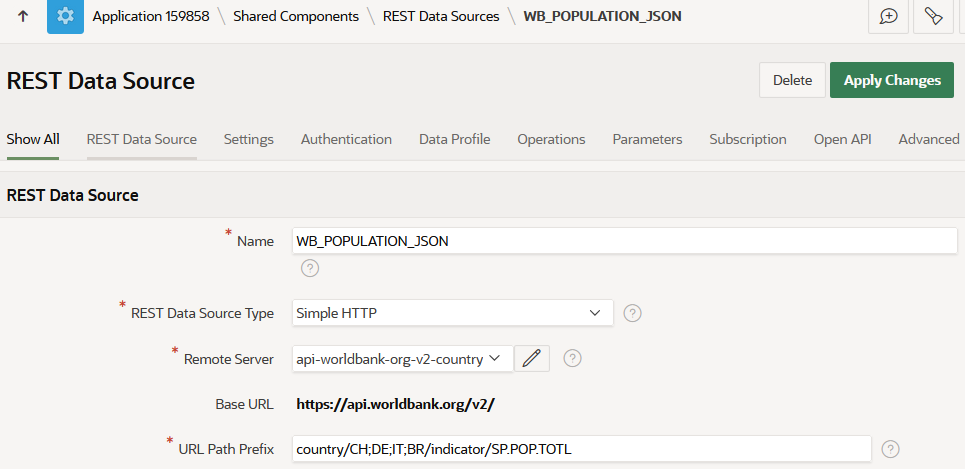
Configured to consume the World Bank API through a native REST Data Source in Oracle APEX.
Response Structure
The World Bank API returns a root-level JSON array composed of two distinct elements:
[0]→ metadata (pagination, total records, navigation context)[1]→ dataset (indicator, country, year, value)
This means the payload should not be interpreted as a flat dataset. Instead, Oracle APEX must consume the response by assigning a specific role to each part of the root array.
This structure requires explicit mapping in Oracle APEX, as the dataset and pagination metadata are exposed separately at the root level.
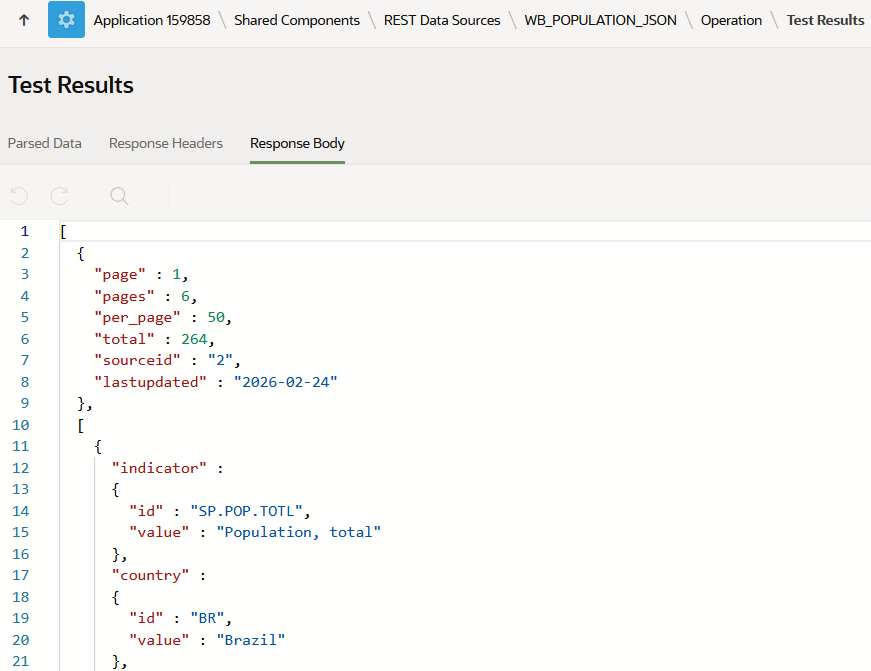
Response Format
To ensure a consistent and deterministic response, the API request must explicitly return JSON.
REST Data Source → Parameters
- Name: format
- Value: json
- Is Static: ON
This guarantees that the response structure remains stable across executions and can be parsed consistently by Oracle APEX.
Parameter configuration forcing format=json
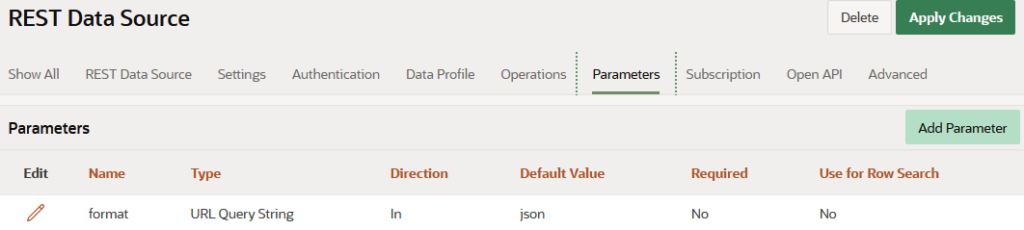
Ensures a deterministic JSON response for APEX data processing.
Data Profile and Column Mapping
The dataset resides in the second element of the root array and must be explicitly defined in the Data Profile.
- Row Selector = [1]
This configuration isolates the dataset from the response, ensuring that Oracle APEX processes only the relevant rows.
With the data boundary defined, column mapping becomes a direct projection of the JSON structure:
Column mapping from JSON attributes into an APEX dataset
- COUNTRY_CODE → country.id
- COUNTRY → country.value
- YEAR → date
- POPULATION → value
This mapping exposes the JSON structure as a relational dataset, enabling native APEX components to consume external data without transformation layers, custom parsing, or local persistence.
Data Profile configuration with Row Selector [1] and column mapping
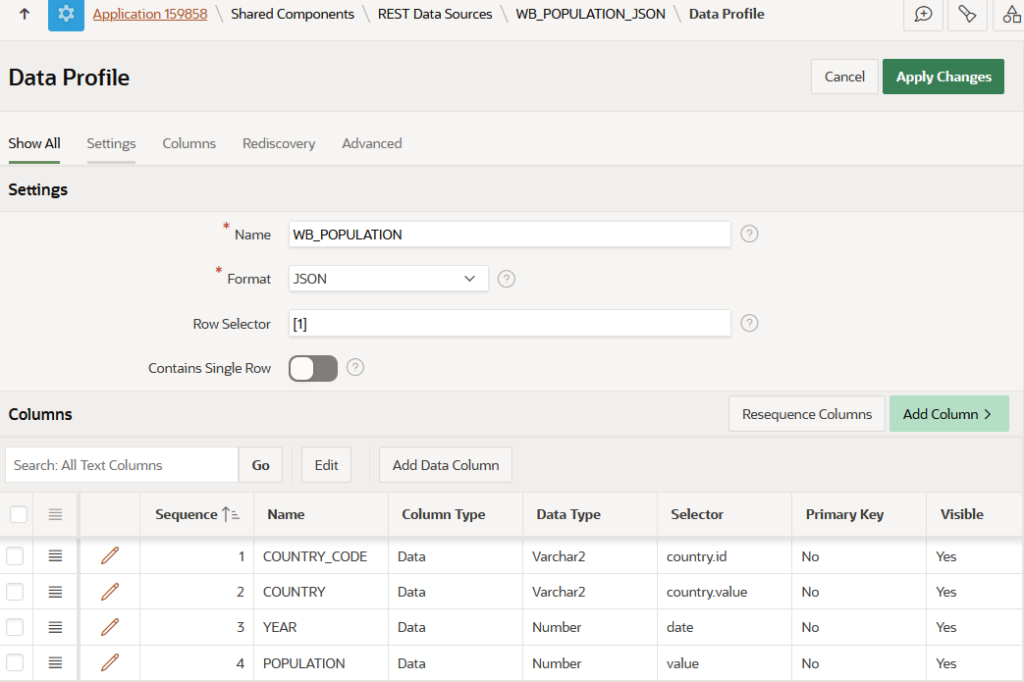
Pagination Alignment
Pagination metadata remains outside the dataset and must be configured separately in the REST Data Source settings.
REST Data Source → Settings
- Pagination Type: Page Size and Page Number
- Page Size Parameter:
per_page - Page Number Parameter:
page - Index of First Page: 1
Total Rows Selector
[0].total
[1]provides the dataset consumed by APEX regions[0]provides the metadata required for pagination control
[1]. The pagination logic comes from [0].Pagination configuration aligned with API metadata
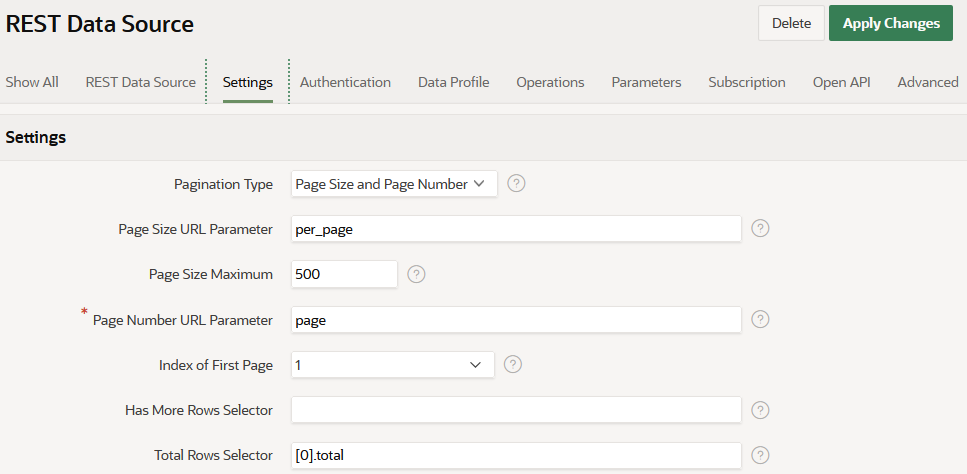
Pagination is controlled by [0].total, while data consumption is isolated to [1].
Validation
The Test Operation → Parsed Data view provides direct confirmation that the configuration is correct.
Expected dataset structure
COUNTRY_CODECOUNTRYYEARPOPULATION
Validation confirms that:
- the response structure is correctly interpreted
- the dataset boundary is correctly defined
- column mapping is aligned with the JSON structure
- pagination is aligned with the API metadata
At this point, the REST Data Source is stable and ready for consumption.
Parsed Data validation
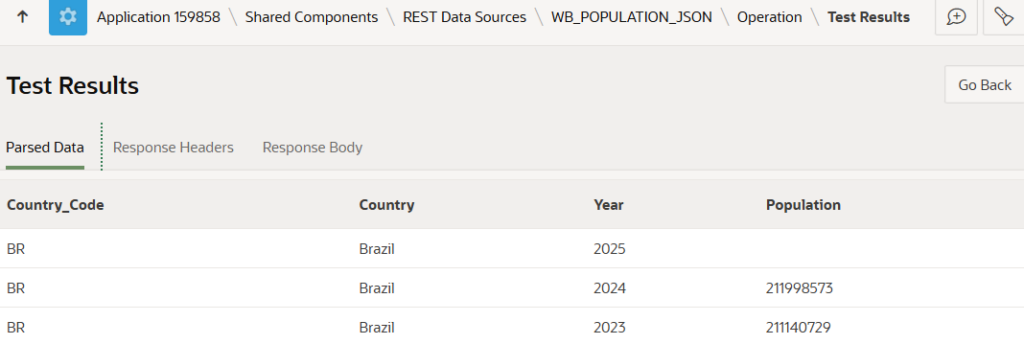
Confirms that the REST Data Source is correctly aligned with the API response structure.
Data Consumption
Once configured, the REST Data Source can be consumed directly by Oracle APEX components.
Oracle JET Chart
Chart configuration
- Source: REST Data Source
- Series: COUNTRY
- X-axis: YEAR
- Y-axis: POPULATION
When multiple countries are requested, for example CH;DE;IT;BR, Oracle APEX automatically renders multiple series — one per country.
The visualization is driven directly by the response structure, without additional transformation logic, local persistence, or intermediate processing.
Oracle JET chart rendering multiple series directly from the REST Data Source
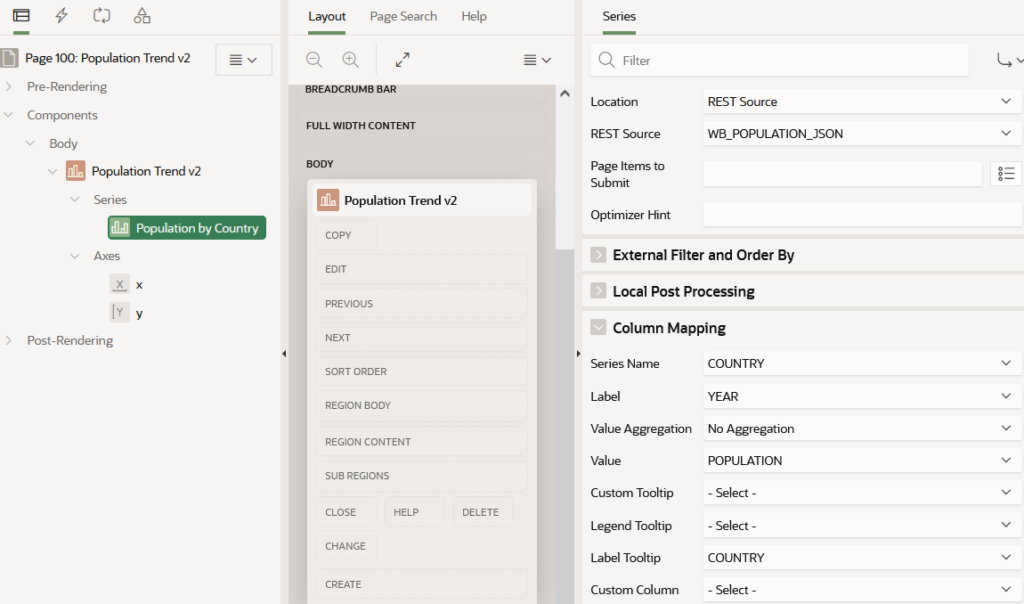
JET Chart configuration using the REST Data Source.
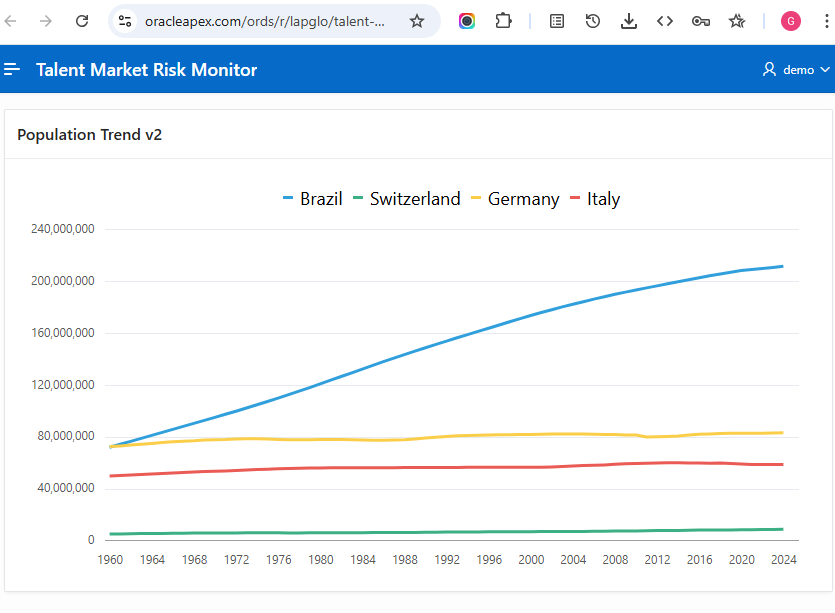
Final multi-series chart rendered directly from live API data.
Result
Outcome
- Multi-country comparison
- Time-series visualization
- Live external data integration
Achieved with
- No local persistence
- No transformation layer
- Full use of native Oracle APEX capabilities
Technical Takeaways
Correct interpretation of the root-array structure unlocks clean, scalable, and fully declarative integrations in Oracle APEX.
Key elements of the pattern
- Row Selector = [1] → explicitly isolates the dataset from the root array
- Total Rows Selector = [0].total → correctly binds pagination metadata without custom PL/SQL
- Static format=json parameter → guarantees deterministic response structure across calls
- Native JET Chart consumption → delivers multi-series visualizations with zero local persistence
Conclusion
Oracle APEX REST Data Sources can natively handle structured API responses in a fully declarative way. By mapping the Row Selector to [1] and the Total Rows Selector to [0].total, a non-flat payload becomes a clean, query-ready dataset.
This pattern enables direct consumption of external APIs in APEX components without middleware, custom parsing, or local persistence.
Once these selectors are in place, any API exposing a
[metadata] + [dataset] root array becomes immediately consumable.