Build a live analytics dashboard in Oracle APEX using a public REST API — no middleware, no local tables.
This example uses the World Bank API with native REST Data Sources to retrieve and visualize economic indicators dynamically.
The integration is implemented using only standard APEX components, focusing on a clean and reproducible pattern.
To simplify the setup and ensure reliable Data Profile discovery, the XML format is used:
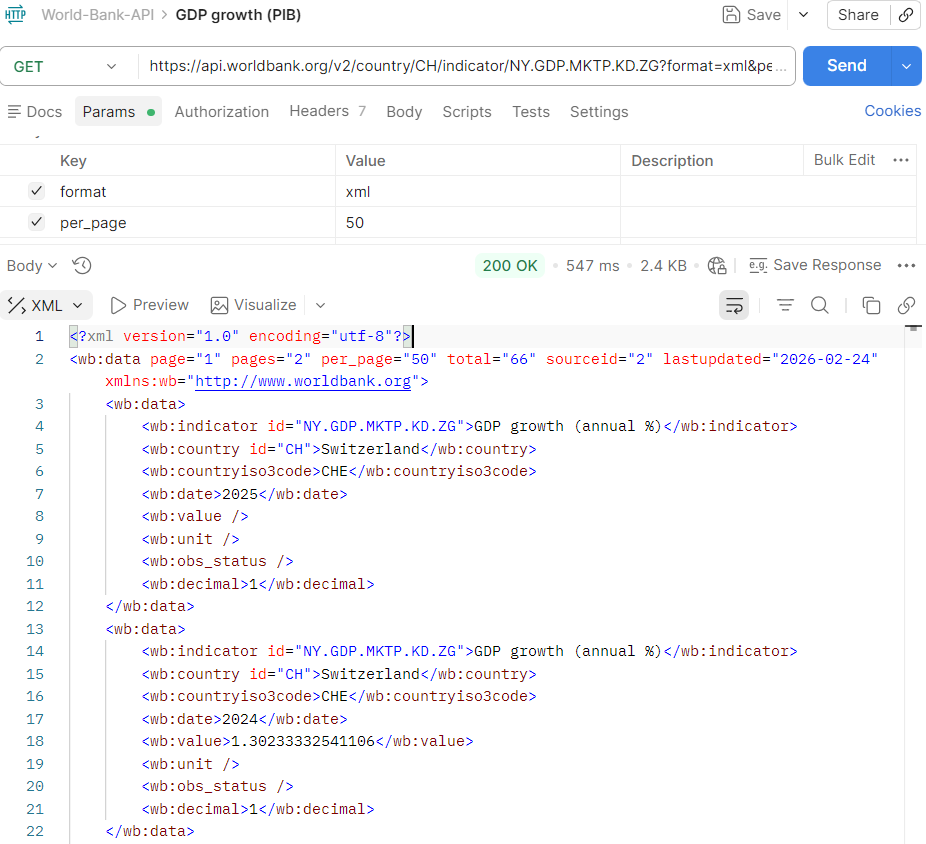
During the initial setup, the JSON response structure introduced additional Data Profile handling, so the XML path was selected for a cleaner native implementation.
Solution building blocks
REST Data Sources
Native integration with the World Bank API.
URL Pattern Parameters
Dynamic country and indicator binding.
Dynamic Actions
Asynchronous refresh driven by user selection.
Partial Region Refresh
Chart and report stay synchronized.
Native APEX Components
Interactive Report and JET Chart, no custom backend.
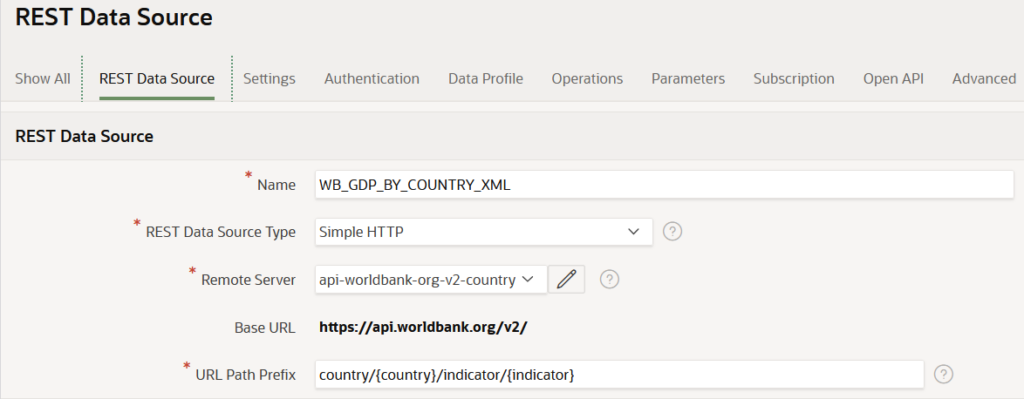
REST Data Source Setup
REST Data Source configuration
Method: GET
Base URL: https://api.worldbank.org/v2/
URL Path: country/{country}/indicator/{indicator}
The setup is parameter-driven, allowing the API request to be dynamically resolved using page items.
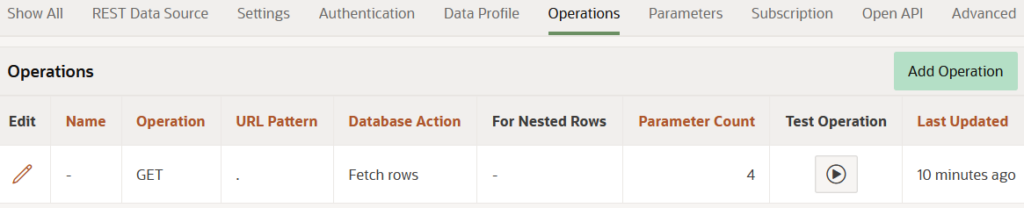
REST Source Operation
The operation is configured manually to control request behavior and ensure consistent responses.
Operation
HTTP Method: GET
Database Operation: Fetch Rows
Parameters
country (URL Pattern)
indicator (URL Pattern)
format = xml
per_page = 50
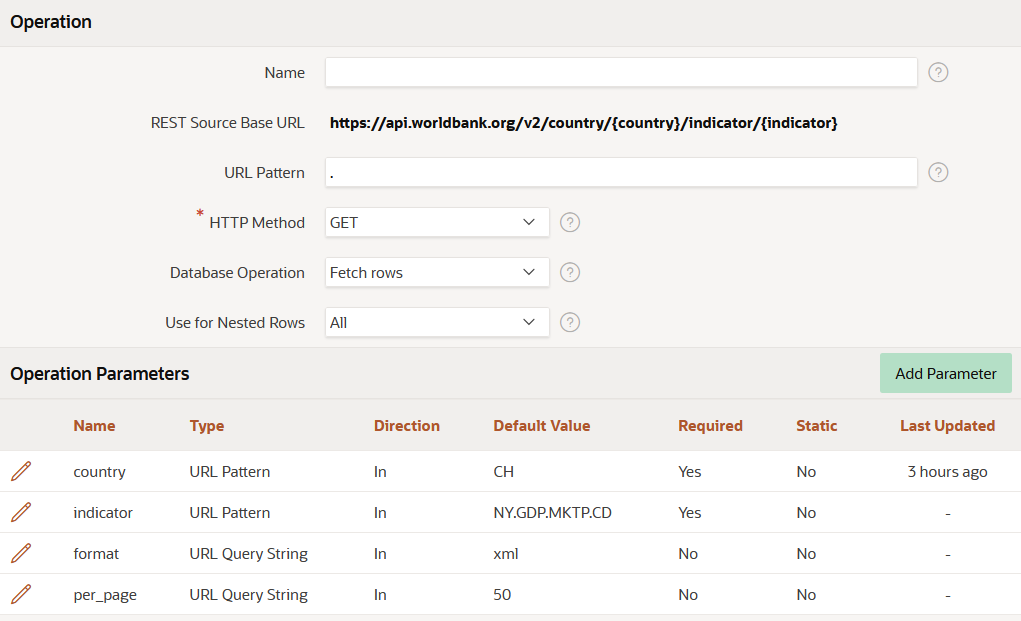
This ensures
Predictable XML response format
Sufficient dataset size for chart rendering
Full control over parameter binding
After defining the REST Source Operation, use the built-in Test Operation feature to validate the endpoint response.
This confirms that the API is reachable and returning data correctly before binding it to any region.
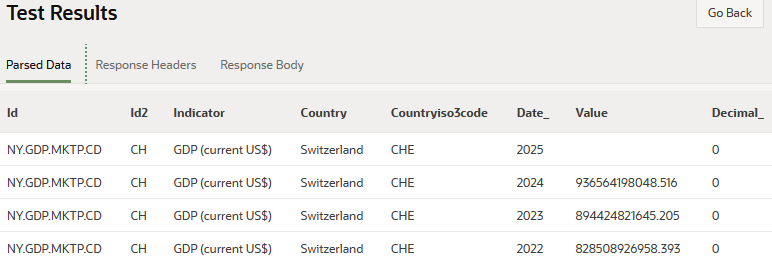
Validation views
Parsed Data: structured view used by APEX
Response Body: raw XML returned by the API
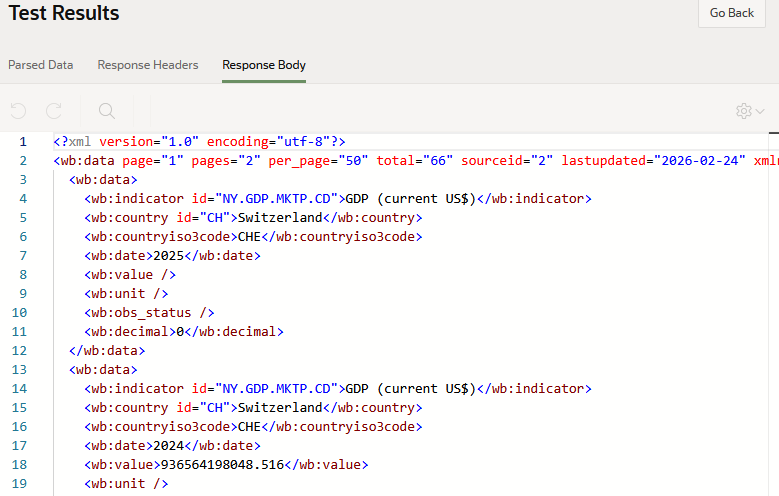
This validation step helps identify issues with parameters, endpoint structure, or data format before moving to chart configuration.
Parameter Binding
Request driven by page items
P10_INDICATOR
These values are submitted with the request and dynamically replace the URL pattern parameters.
This keeps the integration flexible and reusable without duplicating REST definitions.
Chart Configuration
The JET Chart uses the REST Data Source directly.
Key configuration
Source Location:
REST Source
REST Source:
WB_GDP_BY_COUNTRY_XML
Page Items to Submit:
P10_COUNTRY, P10_INDICATOR
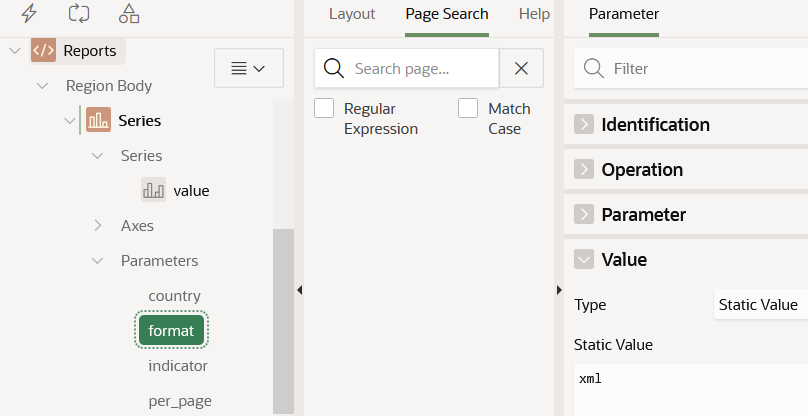
Inside the chart
Series → Parameters
country: P10_COUNTRY
indicator: P10_INDICATOR
format: xml
per_page: 50
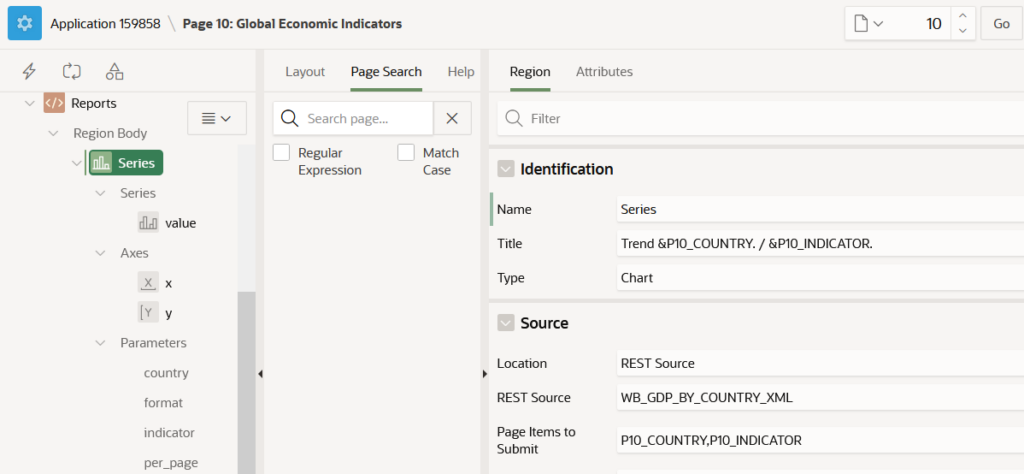
The format parameter is explicitly set to XML to align with the REST Source operation configuration.
Region Synchronization
The page contains two regions: an Interactive Report and a JET Chart.
Both the JET Chart and the Interactive Report consume the same REST Data Source, ensuring that tabular and visual representations stay fully aligned.
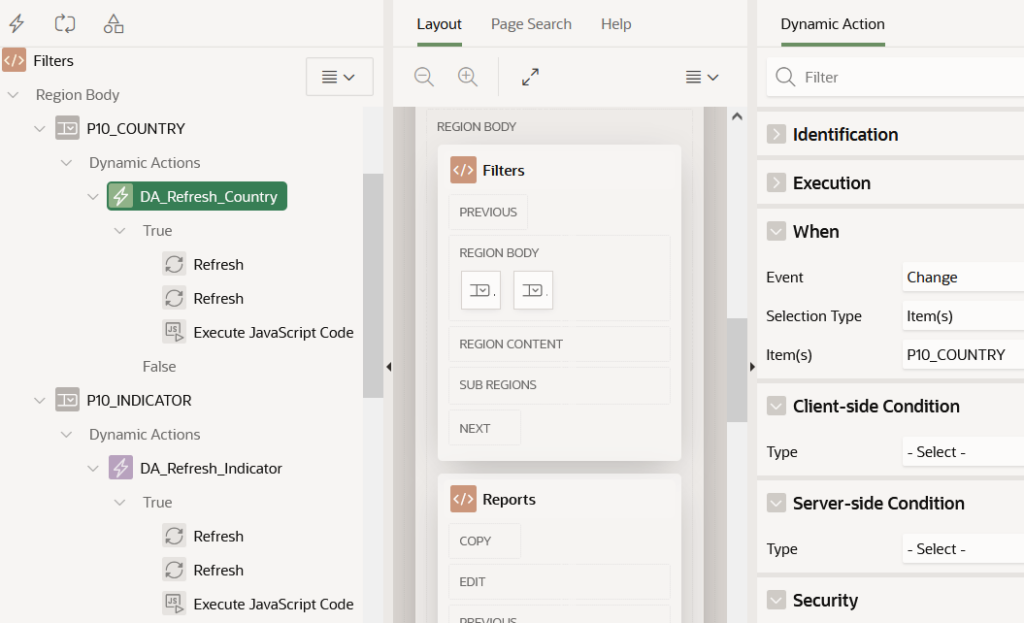
Dynamic refresh triggers
P10_INDICATOR changes
This ensures
Consistent data across regions
No duplicate API calls
Synchronized UI behavior
Interactive Report (Same REST Source)
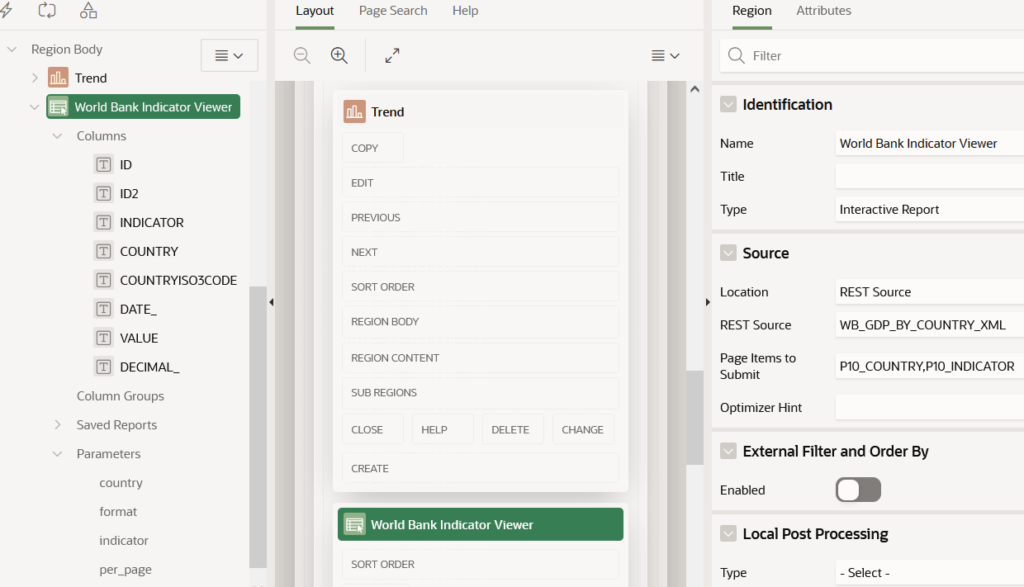
In addition to the chart, an Interactive Report was configured using the same REST Data Source.
- Shares the same parameter-driven REST call
- Automatically refreshes via Dynamic Actions
- Provides tabular validation of chart data
This dual-region approach ensures both visual insight and data transparency using a single API integration.
Interactive Report bound to REST Source
Dynamic Action refresh setup
Related UI fix
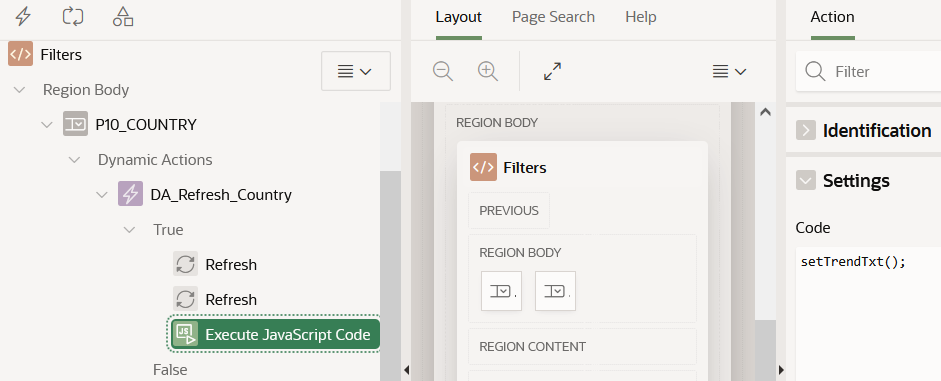
After refreshing the regions, a final Execute JavaScript Code action is used in the True branch to keep the chart title synchronized with the current selection.
Root cause: APEX region titles are not recomputed on partial refresh when using substitution strings.
The full explanation of this JET Chart title refresh issue is covered here:
Fixing Oracle APEX JET Chart Titles That Don’t Refresh
Related Oracle APEX community discussion:
Oracle Forum thread
No local persistence layer is required for this dashboard
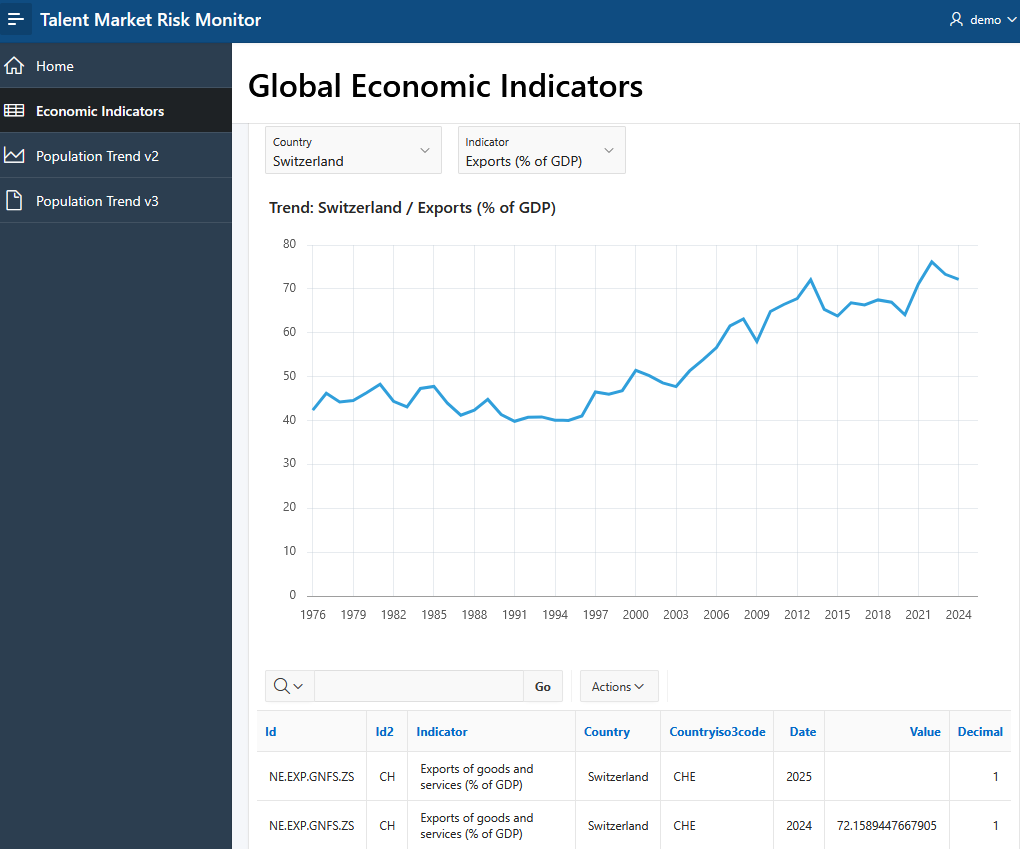
The final application provides a simple but effective REST-driven dashboard.
What happens in the final flow
1. User selects country and indicator
2. REST request is executed dynamically
3. Chart and report refresh automatically
4. No data is stored locally
Running dashboard
Conclusion
This implementation demonstrates a practical Oracle APEX integration pattern using REST Data Sources with a parameter-driven approach.
XML was intentionally used as the response format to provide a stable and predictable structure, making Data Profile discovery in Oracle APEX easier and more reliable, while reducing parsing issues.
The key value is not the dataset itself, but the reusable integration pattern behind it.
Core pattern
Parameter-driven REST calls
Native APEX rendering (no custom backend)
Dynamic Actions for synchronization
Controlled response validation via “Test Operation”
No middleware layer required
This pattern can be reusable with any REST API that provides a structured response compatible with APEX Data Profiles.
Source Code
The application APEX export is available on GitHub:
👉 View project on GitHub – talent_market_risk_monitor_v1.0.sql
This allows you to import the application, explore the REST Data Source configuration, and reproduce the dashboard behavior described in this article.
Note: This example focuses on the integration pattern. In production, Authorization Schemes and proper access control should be applied to ensure that only intended users can access the data.