This article comes from a real issue I encountered during hands-on development and later shared with the Oracle APEX community.
A practical Oracle APEX pattern to keep a JET Chart title aligned with user selections — both on initial page load and after dynamic refresh.
While building a JET Chart in Oracle APEX, I ran into a small but visible UI inconsistency: the chart data refreshed correctly, but the title did not always reflect the user’s current selection.
At first, it looked like a refresh issue. After a closer look, the behavior turned out to be more precise than that. When the region title was defined with substitution strings such as &P10_COUNTRY.. and &P10_INDICATOR. , the title could display internal values instead of readable labels on initial load, and could remain outdated after a partial refresh.
In practice, this created two distinct symptoms:
- on page load: the title displays internal values such as CH and NE.EXP.GNFS.ZS instead of labels Switzerland and Exports (% of GDP)
- after refresh: the chart series updated correctly, but the title could remain stuck on the previous selection
This article explains why that happens and shows a lightweight fix that keeps the chart title synchronized with the current user selection at all times.
Problem Context
I encountered this behavior while building a small Oracle APEX dashboard connected to the public World Bank API. The page includes two Select Lists:
- P10_COUNTRY
- P10_INDICATOR
These items drive a JET Line Chart used to display economic indicators over time.
The chart region title was initially defined like this: Trend: &P10_COUNTRY. / &P10_INDICATOR.
That kind of mismatch looks minor, but in interactive dashboards it weakens trust quickly. The data is correct, yet the interface suggests otherwise.
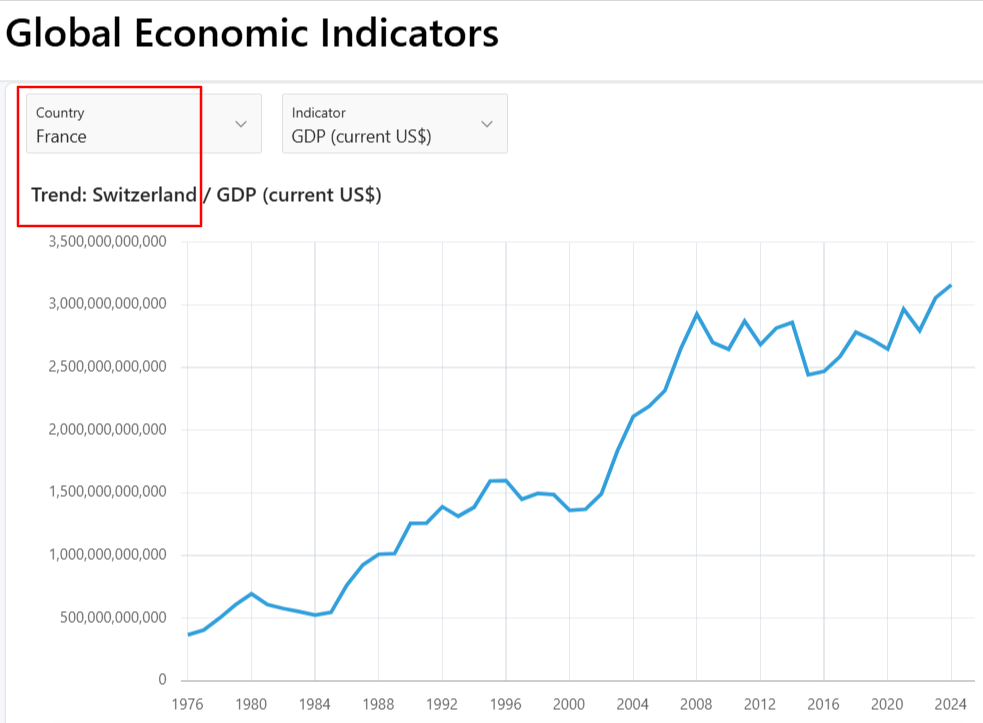
Expected behavior
- the page loads with a readable title based on the current Select List labels
- the user changes country or indicator
- the chart refreshes
- the chart title updates to match the new selection
Actual behavior
- the chart series refreshes correctly
- the region title may show internal item values on initial load
- the region title may remain outdated after a dynamic refresh
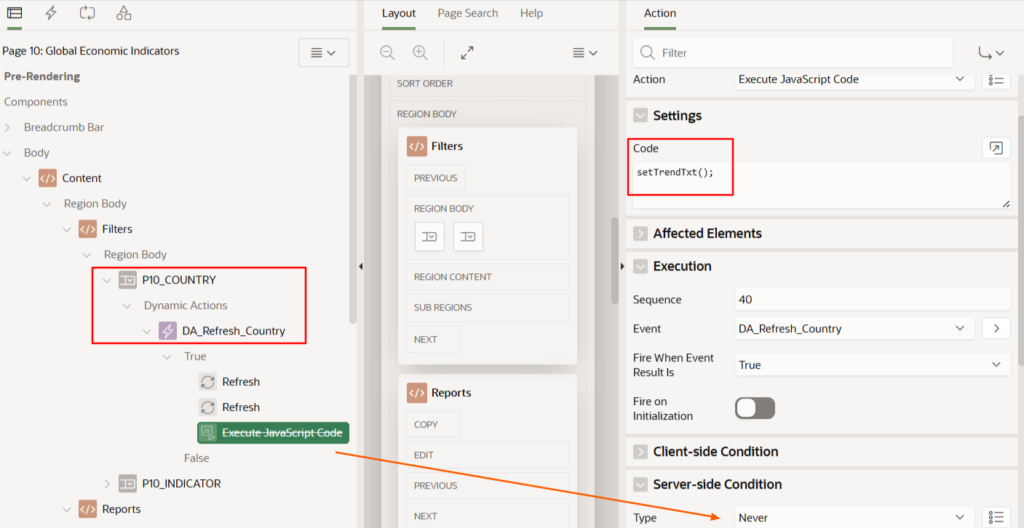
To reproduce the refresh issue, you can temporarily disable the JavaScript action responsible for updating the title:
What Is Really Happening
The behavior becomes easier to understand once you separate the two layers involved in Oracle APEX rendering:
- server-side rendering — where substitution strings are resolved and the initial HTML is generated
- client-side runtime — where Dynamic Actions, JavaScript, and partial refresh take over in the browser
These layers do not automatically keep every visible UI element synchronized.
That is the core issue here: the chart data can refresh correctly while the title remains outdated, because the series and the region header do not follow the same update path.
The Root Cause
The issue was caused by the combination of two separate mechanics:
- value-versus-label rendering on initial page load
- missing title recomputation after partial refresh
Cause 1 — Substitution strings return the stored value
On initial page load, substitution strings such as &P10_COUNTRY. . use the item value held by APEX state. For a Select List, that means the internal value, not the visible display label.
So even if the UI shows:
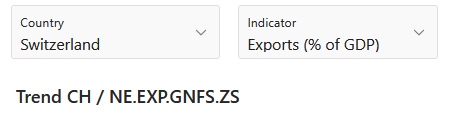
- Switzerland
- Exports (% of GDP)
The title region can still render:
- CH
- NE.EXP.GNFS.ZS
Cause 2 — Partial refresh does not rebuild the title automatically
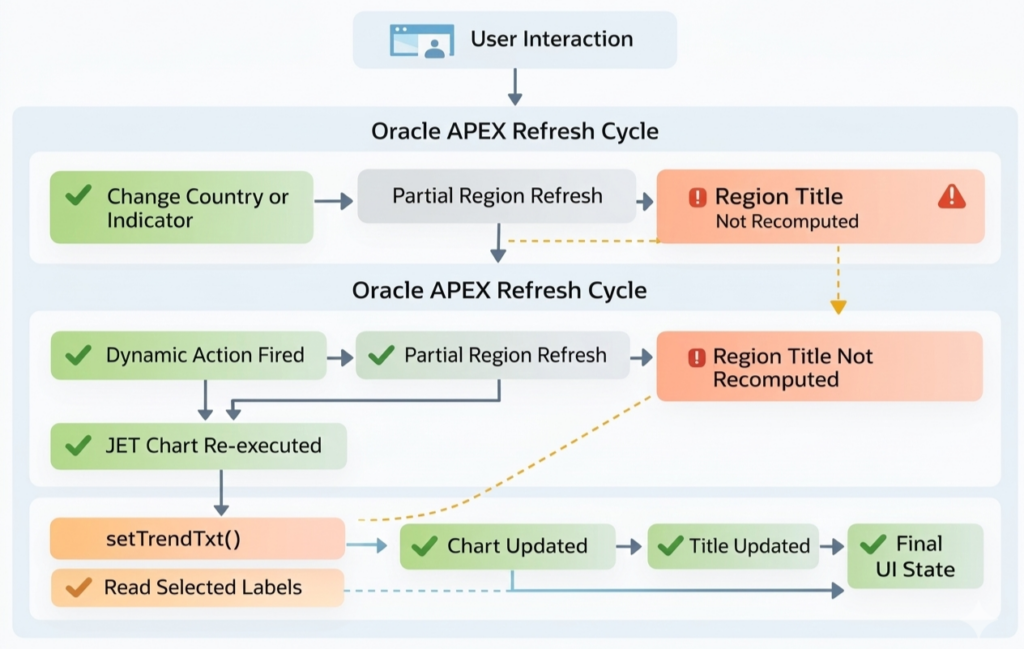
After the user changes a filter, Oracle APEX refreshes the chart region. During that process:
- the chart source is re-executed
- the JET chart series is refreshed
- the region title is not automatically recalculated from the current Select List labels
That is why the data moves forward while the title stays behind.
The Fix Pattern
Once the cause is clear, the fix is straightforward:
- build the title from the display labels, not the raw values
- run the synchronization once on page load
- run the same synchronization again after refresh
This keeps the existing chart region intact and avoids unnecessary structural changes.
The same pattern can also be reused in report headers, cards, static regions, and other APEX components where contextual text depends on page items and partial refresh.
Implementation
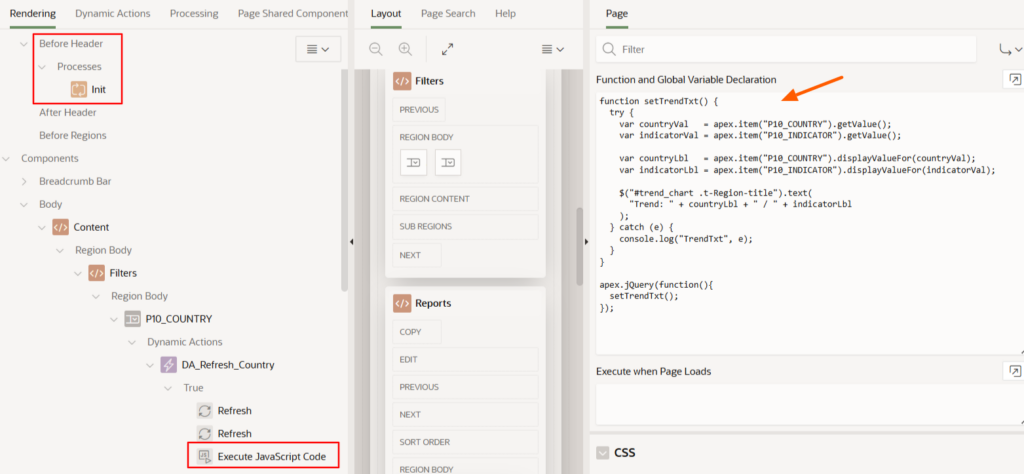
The implementation uses apex.item(…).displayValueFor(…) to resolve the visible Select List labels instead of the underlying values.
function setTrendTxt() {
  try {
    var countryVal   = apex.item("P10_COUNTRY").getValue();
    var indicatorVal = apex.item("P10_INDICATOR").getValue();

    var countryLbl   = apex.item("P10_COUNTRY").displayValueFor(countryVal);
    var indicatorLbl = apex.item("P10_INDICATOR").displayValueFor(indicatorVal);

    $("#trend_chart .t-Region-title").text(
      "Trend: " + countryLbl + " / " + indicatorLbl
    );
  } catch (e) {
    console.log("TrendTxt", e);
  }
}

apex.jQuery(function () {
  setTrendTxt();
});
Page setup
- Function and Global Variable Declaration: include the function and call setTrendTxt() inside apex.jQuery(function(){ … })
- Before Header process: initialize default values when required
Example initialization:
if :P10_COUNTRY is null and :P10_INDICATOR is null then
  :P10_COUNTRY   := 'CH';
  :P10_INDICATOR := 'NE.EXP.GNFS.ZS';
end if;
Dynamic Action setup
- Event: Change
- Selection Type: Item(s)
- Items: P10_COUNTRY, P10_INDICATOR
- True Action 1: Refresh region TREND_CHART
- True Action 2: Execute JavaScript Code → setTrendTxt();
This sequence matters: refresh first, then update the title.
The Result
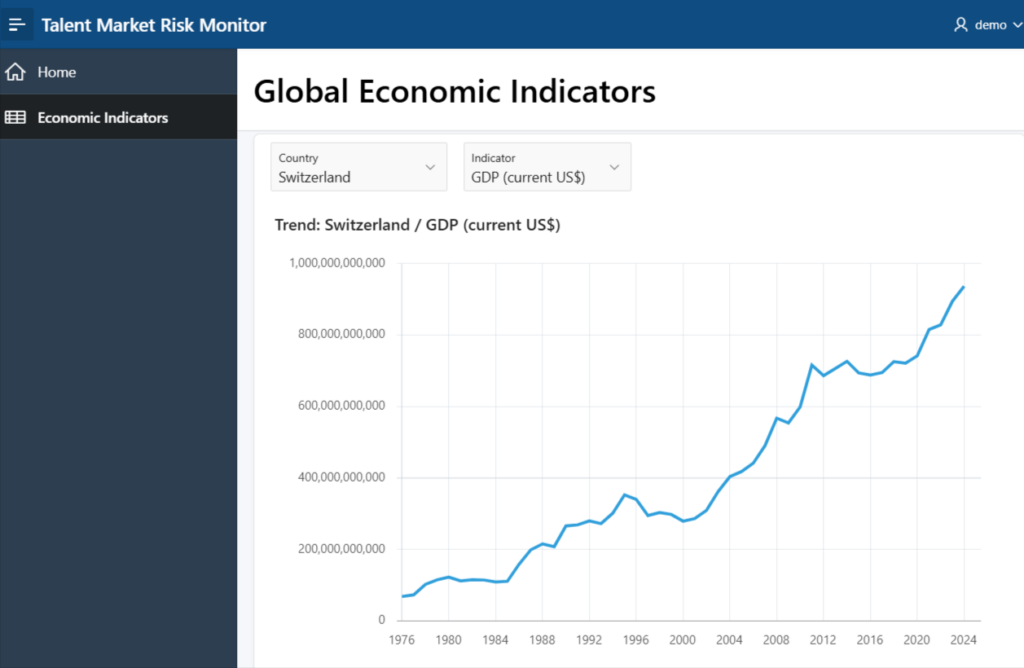
After applying the function on both page load and refresh, the UI behaves consistently from the start:
- the chart series renders correctly
- the region title uses readable labels on initial load
- the region title updates correctly after each filter change
Observed behavior after the fix:
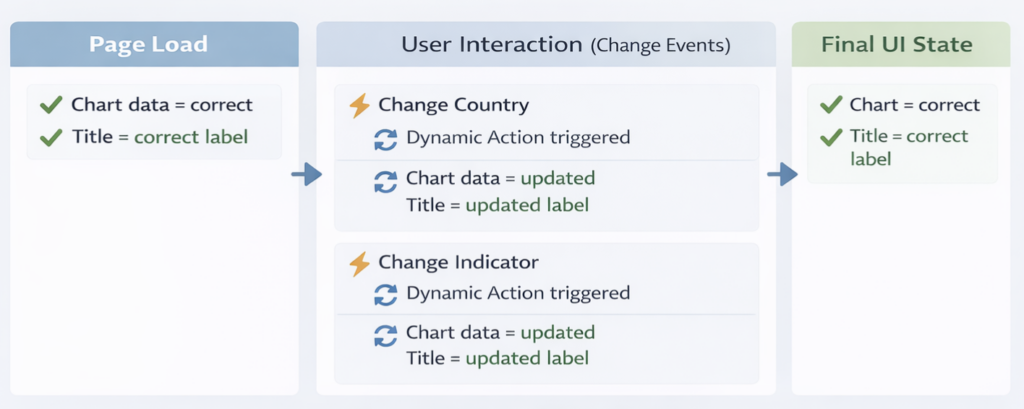
The dashboard now behaves the way users expect: changing a filter updates both the data and the visible context around it.
Why This Matters in Oracle APEX Dashboards
In interactive dashboards, users rely on visual context. If the title does not match the data, trust drops immediately.
This pattern highlights three practical Oracle APEX behaviors:
- substitution strings do not automatically return the visible label of a Select List
- partial refresh updates data, but not necessarily all related DOM elements
- client-side synchronization may be required to keep UI elements aligned with refreshed data
The key takeaway is simple: refreshing data does not guarantee that all visible elements stay in sync.
Conclusion
If your Oracle APEX JET Chart refreshes its data while the region title falls out of sync, the issue may have nothing to do with the query, the REST source, or the chart itself.
In this case, the real problem was the combination of raw value rendering on initial load and missing title synchronization after partial refresh.
A small JavaScript helper solved both cleanly by reading the visible Select List labels and updating the region title at the right moments.
For interactive dashboards, this is a practical fix that preserves a consistent UI without redesigning the page.
Related Discussion
This issue was originally documented in the Oracle APEX community:
👉 Oracle Forum Thread – JET Chart refresh updates data but not region Title using substitution strings
This article extends that discussion with the final corrected implementation, including the page-load synchronization step.
This article is part of my Oracle APEX experiments and reusable patterns series.