This article comes from a practical Oracle APEX scenario I faced while preparing an application for testing and review.
At some point, an application reaches a stage where external testing is required, and someone asks: “Can you send me a login so I can test it?”
Sharing an Oracle APEX application for testing can unintentionally expose workspace-level access if misconfigured.
In Oracle APEX, an incorrect setup may grant more than application-level access.
Instead of letting someone test the app, you may accidentally expose App Builder, SQL Workshop, or workspace-level administration.
There is another subtle issue that is often overlooked: session handling.
This article presents a reusable security pattern for sharing Oracle APEX applications securely.
The goal is to provide secure application access without exposing workspace privileges or sharing the wrong session context.
This transforms a routine setup into a controlled security decision based on least privilege and controlled access.
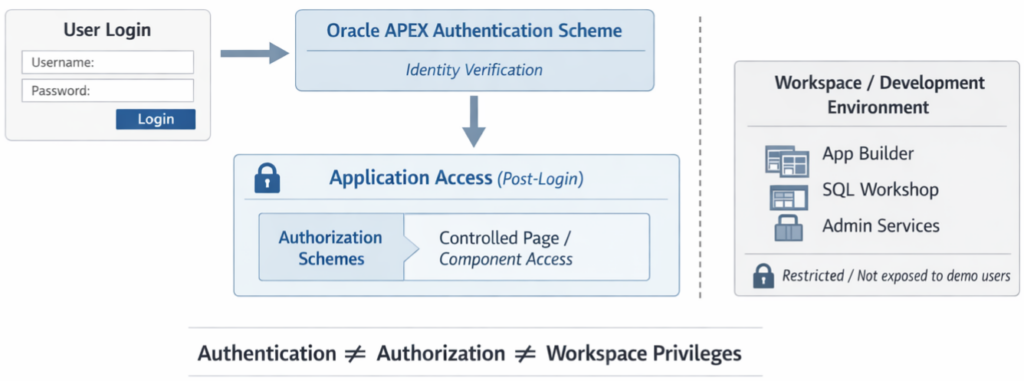
Secure Demo Access Pattern
The pattern is based on the following principles:
- Check that the application uses Oracle APEX Accounts
- Create a dedicated APEX user for application access only
- Disable all workspace-level privileges
- Share only minimal credentials and a clean access path
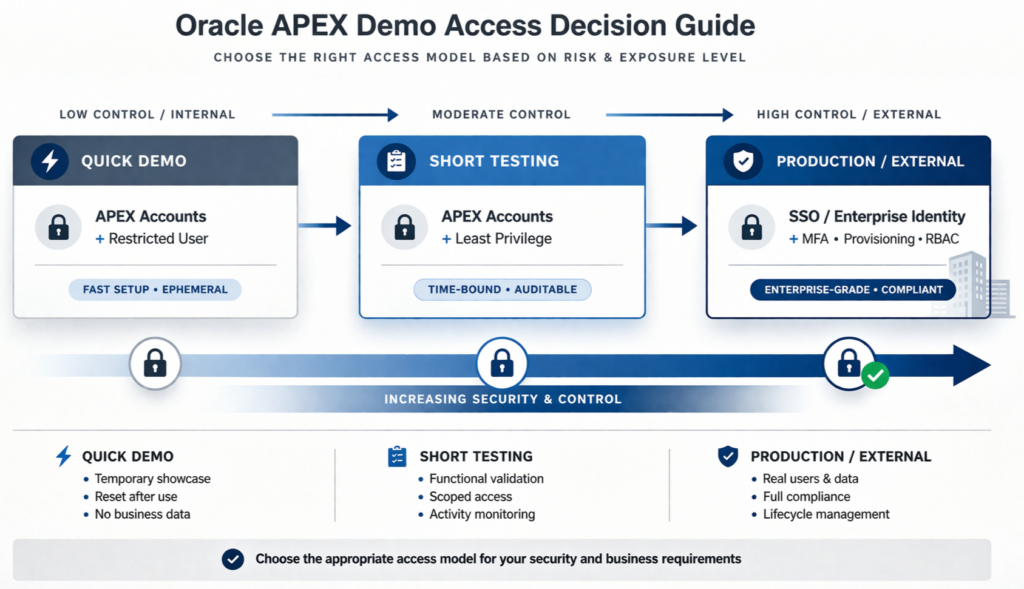
This approach is suitable for quick internal demos and controlled testing.
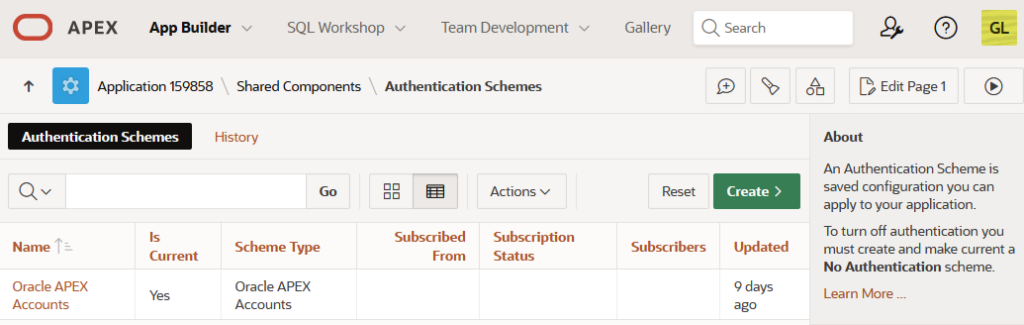
Step 1 — Check the Authentication Scheme
This is critical because APEX user creation only works with internal authentication schemes.
In Oracle APEX: App Builder → Shared Components → Authentication Schemes
Confirm the app uses: Oracle APEX Accounts
If not, user creation will fail. This is a common issue in time-constrained demo scenarios.
Step 2 — Create a Demo User
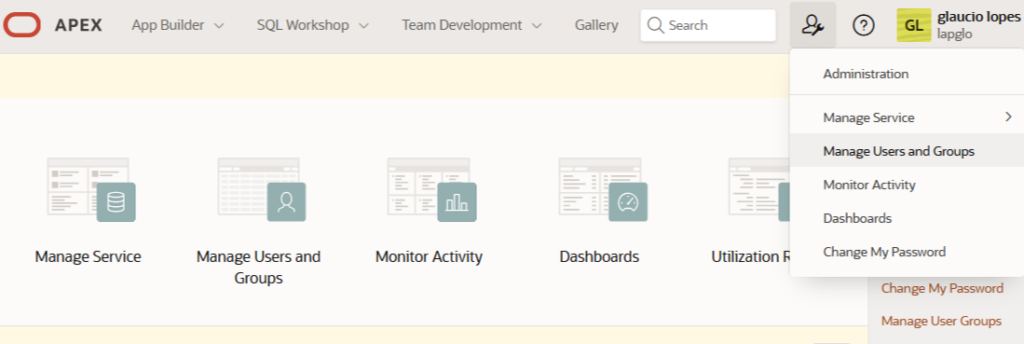
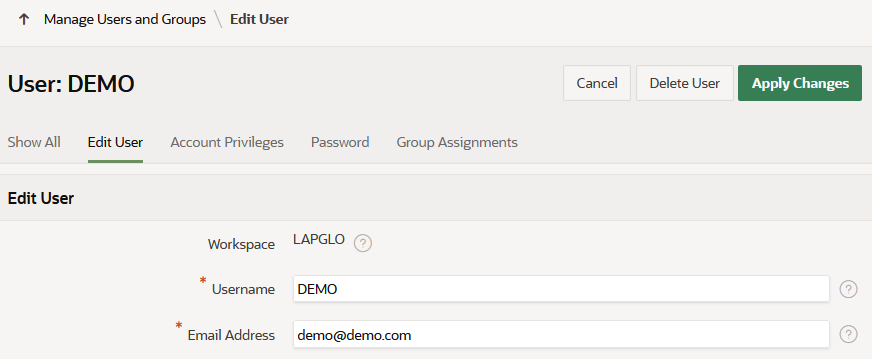
Go to: Workspace Administration → Manage Users and Groups → Create User
- Username: demo
- Password: temporary, controlled password
This account must be restricted to application access only.
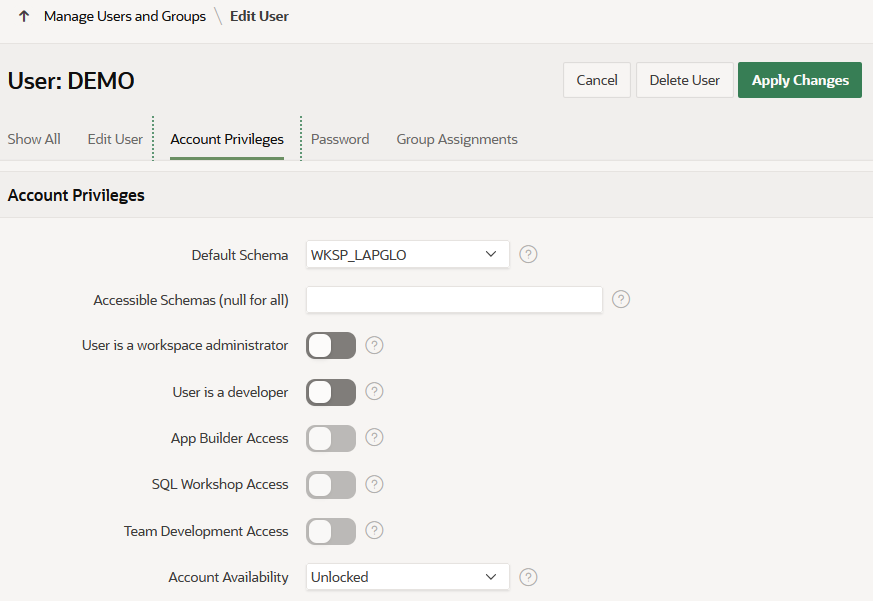
Step 3 — Disable All Unnecessary Privileges
- Workspace Administrator: OFF
- User is a Developer: OFF
- App Builder Access: OFF
- SQL Workshop Access: OFF
- Team Development Access: OFF
Demo access must remain strictly application-level.
⚠️ Common Pitfall — Session Sharing
This is a frequent and often overlooked mistake in APEX demos.
A developer logs into the application, copies the URL from the browser, and sends it directly to a tester.
The URL may contain the current session ID.
In Oracle APEX, application URLs include a session identifier (f?p=App:Page:Session).
Sharing a URL with an active session ID may lead to invalid session reuse or unintended session sharing across users.
Sessions may also expire or become invalid, which can further break access when sharing session-based URLs.
This creates two issues:
- The tester may fail to access the application
- In some cases, it may expose unintended session behavior
Best practice:
- Always share a clean application URL
- Ensure the tester creates their own session via login
- Never share URLs tied to your active session
This frequently leads to inconsistent session behavior and potential security risks.
Why This Works
Oracle APEX separates authentication (who you are) from authorization and workspace privileges (what you can access).
Misunderstanding this separation is a common root cause of unintended exposure in demo environments.
- Application authentication
- Workspace privileges
Authentication does not require builder access. Treating those as separate decisions avoids accidental exposure.
Common Mistakes
- Creating users without checking authentication scheme
- Enabling privileges “just in case”
- Sharing session-based URLs
- Reusing demo accounts without control
- Assuming that disabling workspace access is sufficient without validating application-level authorization
Security Considerations
- Apply the minimum privilege principle
- Avoid exposing workspace tools
- Use temporary credentials
- Be aware of session behavior
- Validate which data is exposed in the environment
- Check whether sensitive pages inside the application use proper Authorization Schemes
Even if the demo user has no access to App Builder or workspace administration, the application itself may still contain internal pages such as configuration, admin, maintenance, or monitoring screens.
Before sharing demo access, confirm that those pages are protected with the appropriate Authorization Schemes. Otherwise, you may successfully lock down the workspace while still exposing areas inside the application that were never meant for testers.
Safe demo access is not only about who can log in. It is also about what they can see after login.
Decision Guide
Practical Takeaway
Safe demo access is not just about creating a user.
It is about:
- Controlling privileges
- Controlling session behavior
- Protecting internal application pages
- Sharing access intentionally
Quick access should not create hidden risks.
Conclusion
This approach helps you share Oracle APEX applications safely, without exposing your workspace or introducing session-related issues.
With one extra check on page-level Authorization Schemes, it also helps ensure that a demo user stays inside the part of the application that was actually meant to be shared.
In Oracle APEX, safe application sharing depends on separating authentication, privileges, session handling, and page authorization.