Notifications are everywhere in enterprise applications, but they are often treated as an afterthought. A button is clicked, a PL/SQL process runs, APEX_MAIL.SEND is called, and the application moves on. When everything works, no one thinks about it.
When something fails, the only question left is: “Did it even go out?”
Instead of treating delivery as a background side effect, we can treat it as a controlled, observable flow. That shift is small in code, but significant in practice.
Let’s build it step by step.
Starting from the UI
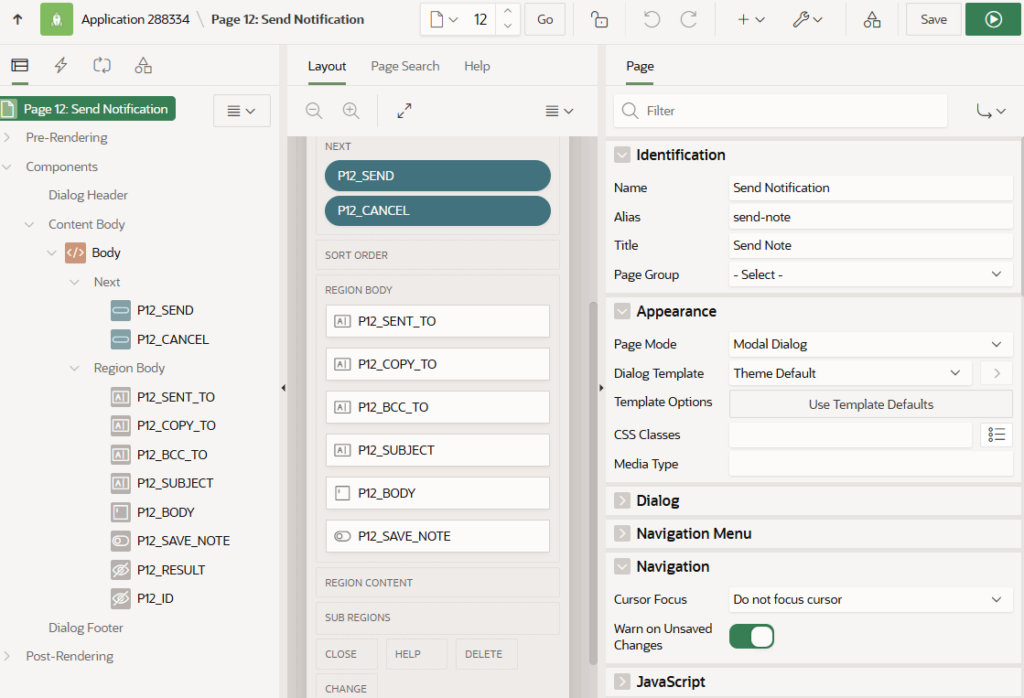
The implementation begins with a simple modal dialog page in Oracle APEX. The page collects recipient information, subject, and message body. The page is intentionally minimal. A modal dialog is used not for style, but for control. It isolates the interaction, prevents double submission, and clearly marks the start of a delivery lifecycle. When the user clicks Send, the responsibility shifts to PL/SQL.
The Core Table: A Clean Audit Surface
Before sending anything, we create a table that will record every delivery attempt.
create table tlx_notes_mail (
    id            number generated by default as identity primary key,
    created_on    timestamp with local time zone default systimestamp,
    created_by    varchar2(255),
    sent_to       varchar2(1000),
    copy_to       varchar2(1000),
    bcc_to        varchar2(1000),
    mail_subject  varchar2(500),
    mail_body     clob,
    mail_id       number,
    status        varchar2(30),
    status_ts     timestamp with local time zone,
    error_message varchar2(4000)
);
This table is not meant to mirror APEX internal mail structures. It simply captures what the application knows at the moment of delivery: who triggered it, when it happened, what was sent, and whether an exception occurred.
That’s enough to make delivery observable.
Validating Before Enqueue
Recipient validation is centralized in a small utility package:
create or replace package tlx_mail_util as
    function normalize_list(p_list varchar2) return varchar2;
    function is_valid_email(p_email varchar2) return boolean;
    procedure validate_email_list(p_list varchar2, p_field_name varchar2);
end;
Validation happens before the message is queued. That keeps errors predictable and prevents avoidable failures from reaching the SMTP layer. The principle is simple: fail early, log clearly.
The Delivery Process
Now we wire the After Submit process.
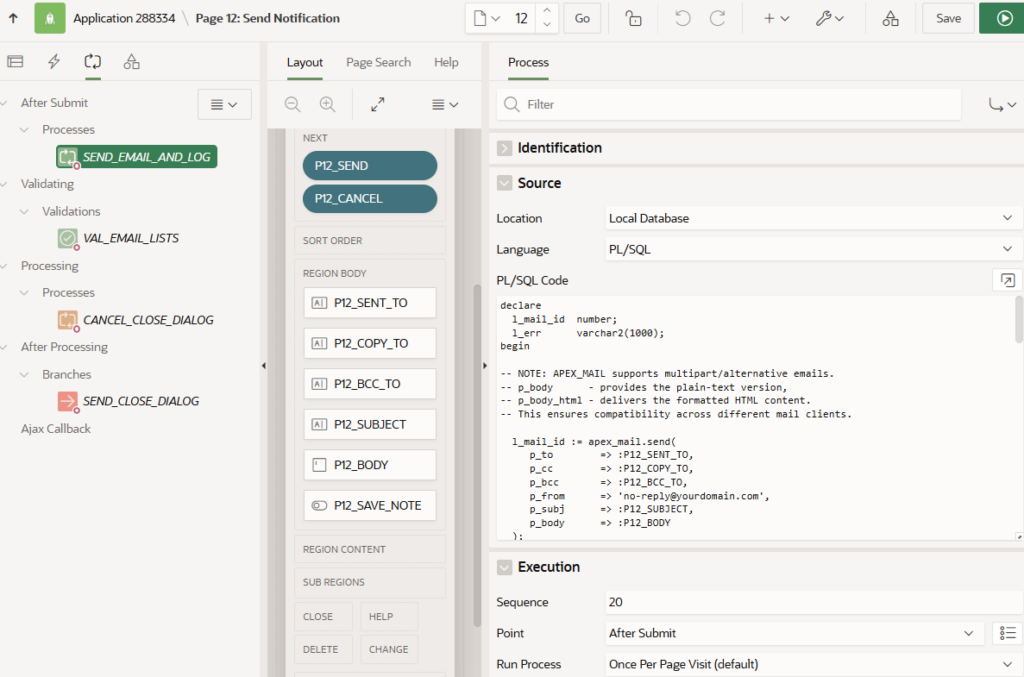
The process does three things:
- Calls
APEX_MAIL.SEND - Optionally calls
APEX_MAIL.PUSH_QUEUE(useful in demo environments) - Inserts a record into
TLX_NOTES_MAIL
Here is the core logic:
declare
    l_mail_id number;
    l_err     varchar2(1000);
begin
    l_mail_id := apex_mail.send(
        p_to   => :P12_SENT_TO,
        p_cc   => :P12_COPY_TO,
        p_bcc  => :P12_BCC_TO,
        p_from => 'no-reply@yourdomain.com',
        p_subj => :P12_SUBJECT,
        p_body => :P12_BODY
    );

    apex_mail.push_queue;

    insert into tlx_notes_mail (
        created_by,
        sent_to,
        copy_to,
        bcc_to,
        mail_subject,
        mail_body,
        mail_id,
        status,
        status_ts
    )
    values (
        :APP_USER,
        :P12_SENT_TO,
        :P12_COPY_TO,
        :P12_BCC_TO,
        :P12_SUBJECT,
        :P12_BODY,
        l_mail_id,
        'QUEUED',
        systimestamp
    );
exception
    when others then
        l_err := sqlerrm;
        insert into tlx_notes_mail (created_by, status, status_ts, error_message)
        values (:APP_USER, 'ERROR', systimestamp, substr(l_err,1,1000));
        raise;
end;
The important part is not the mail call itself. It is the fact that both success and failure are recorded. Nothing disappears silently.
What Actually Happens After SEND
Once APEX_MAIL.SEND is called, the message is placed into the internal APEX mail queue. From there, the APEX mail engine processes the queue and delivers messages through the configured SMTP provider.
The full path looks like this: APEX UI → PL/SQL → APEX_MAIL → SMTP → Inbox
The application controls everything up to enqueue. Infrastructure handles transport. That boundary matters. This pattern guarantees application-level traceability. It does not attempt to control bounce handling or downstream mailbox rejection. Inbox delivery depends on SMTP configuration and network permissions.
Clear boundaries make the design stable.
Making It Visible
To make the delivery lifecycle visible, we expose the audit table through an Interactive Report.
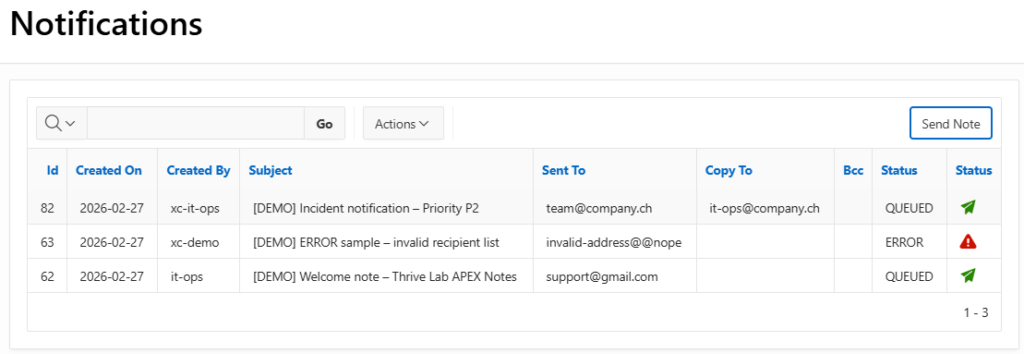
Each row represents a single attempt. Status icons make it easy to distinguish queued versus error states:
case status
  when 'QUEUED' then
     '<span class="fa fa-paper-plane u-success-text" title="Queued"></span>'
  when 'ERROR' then
      '<span class="fa fa-pencil u-info-text" title="Draft"></span>'
end as status_icon
Now, when something goes wrong, the question is no longer “Did it go out?” It becomes “What happened?” — and the answer is already in the application. Support no longer depends on database access or guesswork.
In Practice
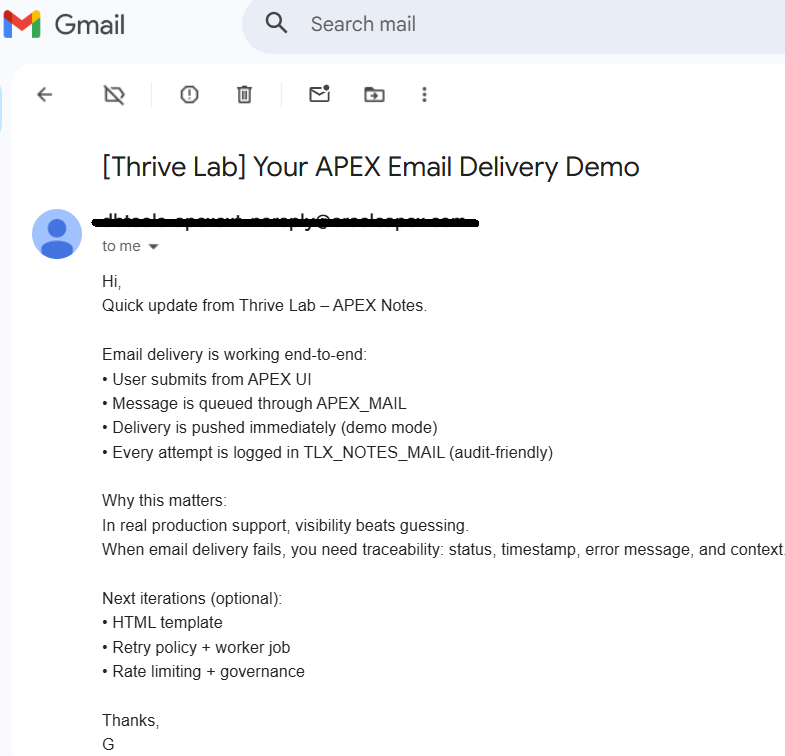
With SMTP configured correctly, sending a message results in a visible audit entry and a real inbox delivery. At this point, the value of the pattern becomes obvious. The delivery is not just executed — it is recorded, timestamped, and reviewable.
Portable by Design
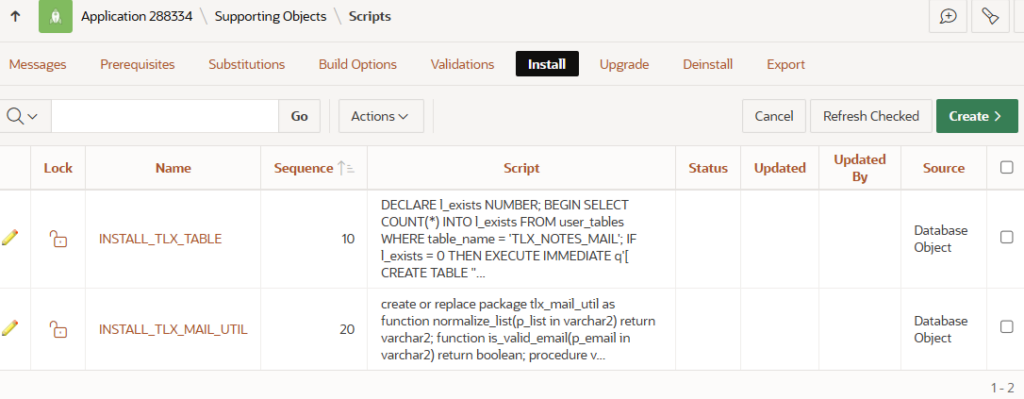
The entire pattern consists of two database objects and a page process:
TLX_NOTES_MAILTLX_MAIL_UTIL
They are included via APEX Supporting Objects. There are no scheduler customizations, no background workers, and no framework dependencies. The footprint remains small, which makes reuse easy. This building block can be embedded into approval flows, workflow engines, compliance dashboards, or any application where notification traceability matters.
Conclusion
Notification delivery does not need to be complex to be controlled. By combining APEX_MAIL with a lightweight audit layer, delivery becomes observable within the application boundary without introducing a framework. The infrastructure handles transport; the application guarantees traceability. Sometimes the real improvement is simply being able to see what your system is doing.